
Chapter 10 · 10.6
Sharing files and viewing them together in a conversation
Available in packages with Office. Talk is included in your WebOké Nextcloud as soon as your package has at least one Office Suite licence. Then everyone in your package can use Talk, even users without their own licence. If you don't have Office, you won't see Talk in the menu. See Which apps are included in my package?.
Sharing a file in a conversation is more convenient than emailing it: everyone in the conversation can open it straight away, and it stays in your Nextcloud.
Sharing a file
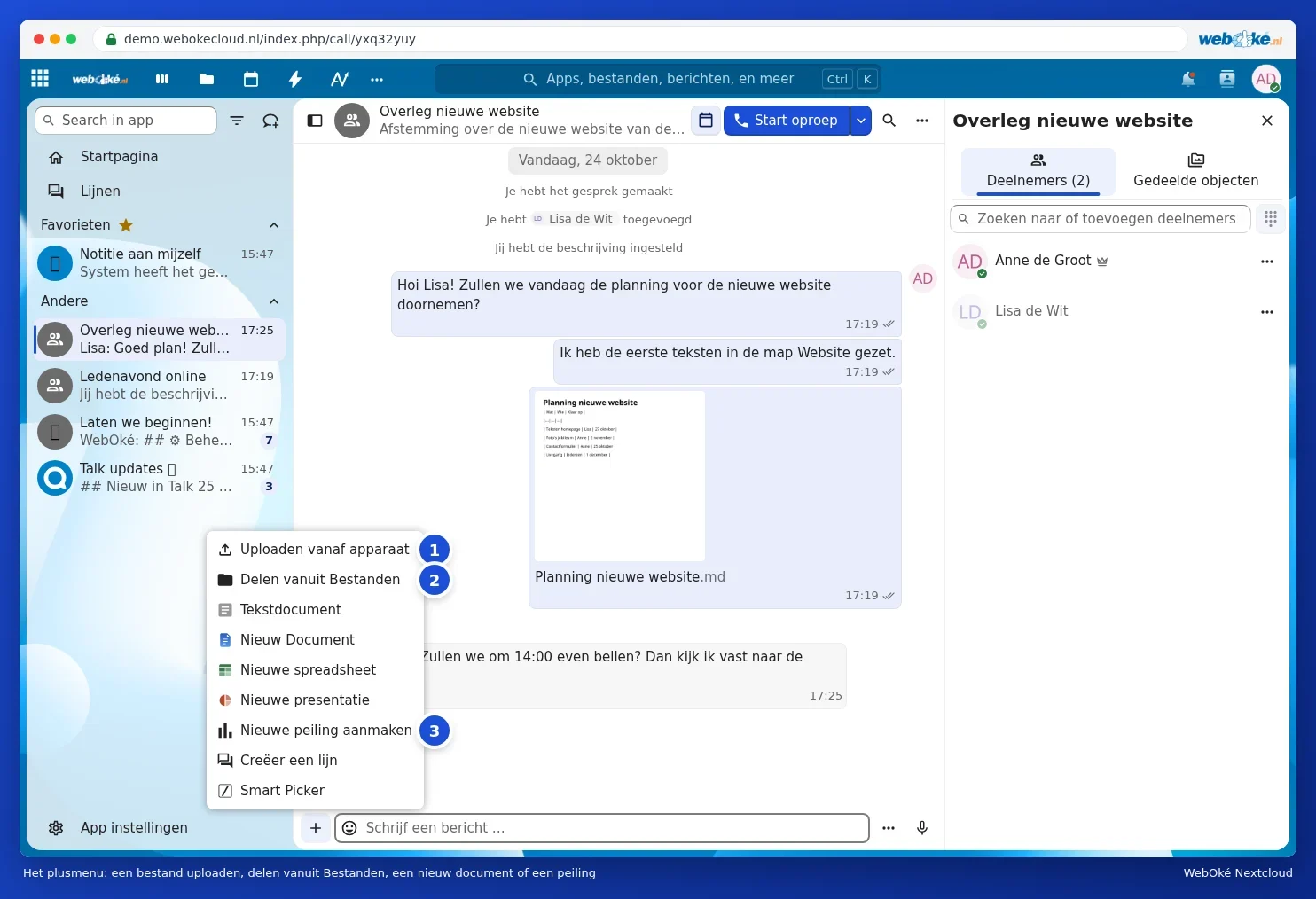
Click the plus icon to the left of the message field. You'll then see:
- Upload from device (1): a file from your computer or phone. You can also simply drag a file into the conversation.
- Share from Files (2): a file that's already in your Nextcloud.
- Text document, New document, New spreadsheet and New presentation: create a new file straight away and share it in the conversation. Documents, spreadsheets and presentations open in Euro-Office; only those with their own Office licence can edit them (see Assigning and ordering extra Office licences). You can read more about Euro-Office in the Euro-Office manual.
- Create new poll (3): ask a question with answers for participants to choose from, for example a date for the next meeting.
Where does an uploaded file end up?
If you upload a file in Talk, Nextcloud places it in your Talk folder in Files. There, it counts towards your storage. The others in the conversation receive the file as a share; it doesn't count towards their storage. See also Anyone using shared files uses your storage.
Finding everything again: Shared items
Click Shared items (1) in the sidebar on the right. You'll then see all the files (2), links, polls and locations that have ever been shared in the conversation, without having to scroll through the chat.

Viewing a document together
Click a shared file in the chat. It opens in your browser, next to the conversation. If you're in a call, the others stay in view while you view the file. All participants can edit a text file at the same time: you'll see each other's cursor. They can edit an Office document together in Euro-Office if they have their own Office licence.
Tip: sharing a file that you'll update later? The others will always see the latest version, because it remains a single file in your Nextcloud. If you want to stop sharing it, delete the message, or remove the share in Files (see Sharing with a user from your own Nextcloud).